Gemini AI से फोटो का बैकग्राउंड एक नैचुरल वेडिंग फोटोशूट सीन में कैसे बदलवाएं
14.5.2026

Gemini AI से फोटो का बैकग्राउंड एक नैचुरल वेडिंग फोटोशूट सीन में कैसे बदलवाएं
अगर आप Gemini AI से किसी फोटो का बैकग्राउंड एक नैचुरल वेडिंग फोटोशूट सीन में बदलवाना चाहते हैं, तो सबसे महत्वपूर्ण चीज सिर्फ मॉडल नहीं है। असली फर्क इस बात से पड़ता है कि आप subject, wedding setting, lighting और final photo finish को कितनी clarity से लिखते हैं। यह गाइड बताएगा कि बेहतर prompt कैसे लिखें, wedding background change अक्सर fake क्यों लगता है, और कब Create Wedding Photos जैसा dedicated workflow एक general AI chat interface से ज्यादा practical होता है।
इस keyword की search intent एक AI wedding photo product से बहुत अच्छी तरह match करती है। यूज़र आमतौर पर कोई random fantasy edit नहीं चाहता। वह ऐसा result चाहता है जो दिखे जैसे:
- bridal portrait
- pre-wedding editorial
- romantic couple photoshoot
- believable wedding keepsake
यानी goal सिर्फ background change नहीं है। Goal है एक natural wedding photoshoot scene बनाना।
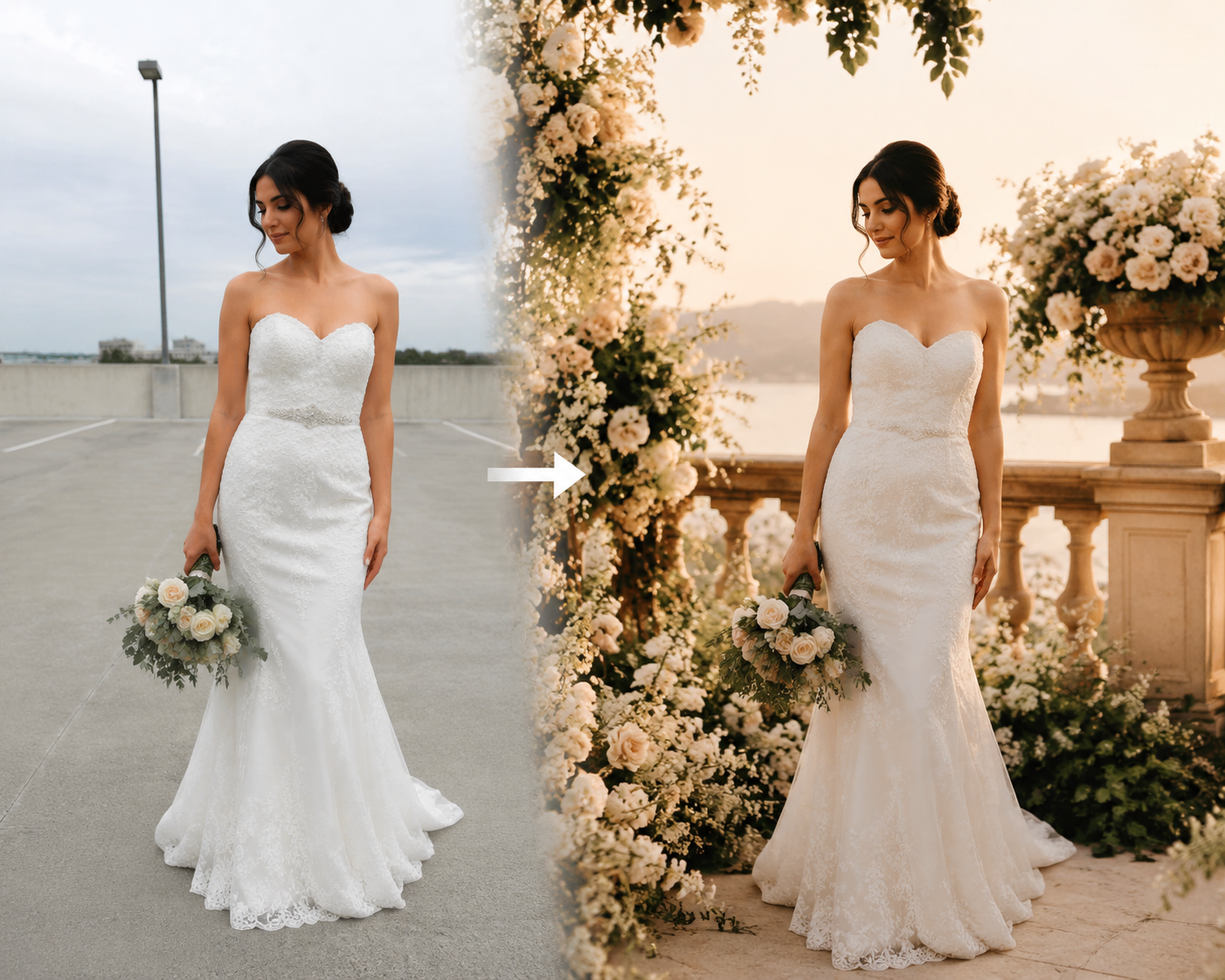
नैचुरल wedding background change साधारण background swap से ज्यादा कठिन क्यों है
कई लोग सोचते हैं कि यह बस cutout और background replace करने का काम है। वास्तव में यह उससे कहीं ज्यादा है।
अगर final result को एक real wedding photoshoot जैसा दिखना है, तो AI को सिर्फ background नहीं बदलना, बल्कि पूरी image को visually unified भी बनाना पड़ता है।
उसके लिए चाहिए:
- believable bridal / wedding styling
- consistent light direction
- realistic color temperature
- natural skin tones
- ऐसा background जो pose और framing से मेल खाए
- final image जो photographed लगे, pasted नहीं
यही कारण है कि weak prompts fail होते हैं। वे केवल “wedding background” कहते हैं, लेकिन scene, light, mood और finish define नहीं करते।
Gemini AI को क्या बताना चाहिए
अगर आप बेहतर result चाहते हैं, तो prompt में ये 4 चीजें साफ होनी चाहिए:
1. Subject
आपको स्पष्ट बताना होगा कि कौन recognizable रहना चाहिए।
Examples:
- preserve the face and identity of the original person
- keep the subject recognizable and realistic
- maintain natural skin tone and facial proportions
यह महत्वपूर्ण है क्योंकि यूज़र चाहता है कि final image अब भी उसी जैसी लगे, किसी और model जैसी नहीं।
2. Wedding background
सिर्फ “wedding background” मत लिखिए। Specific setting लिखिए:
- romantic garden wedding photoshoot
- luxury indoor bridal studio
- beach wedding at golden sunset
- elegant European terrace
- soft floral ceremony backdrop
जितना specific background होगा, result उतना coherent होगा।
3. Lighting
Fake-looking edits अक्सर lighting की वजह से खराब लगते हैं।
आप ऐसे phrases इस्तेमाल कर सकते हैं:
- soft natural wedding light
- golden hour bridal lighting
- elegant diffused editorial light
- warm romantic indoor window light
इससे model subject और background को बेहतर तरीके से match कर पाता है।
4. Final finish
आपको final image style भी define करना चाहिए:
- realistic wedding photography
- premium bridal editorial
- natural skin texture
- elegant luxury wedding portrait
- magazine-quality wedding photoshoot
अगर यह layer missing है, तो result generic, artificial या overly stylized लग सकता है।
एक बेहतर prompt formula
एक vague one-line prompt से बेहतर है कि आप structured prompt लिखें।
Prompt formula:
- original person की identity preserve करें
- wedding setting describe करें
- lighting describe करें
- final photography finish describe करें
- realism और facial consistency mention करें
Example structure:
Preserve the original woman's face and identity. Change the background into a romantic garden wedding photoshoot with soft floral arrangements, elegant bridal atmosphere, warm natural light, realistic skin texture, premium editorial wedding photography, natural depth of field, and a believable bridal portrait finish.
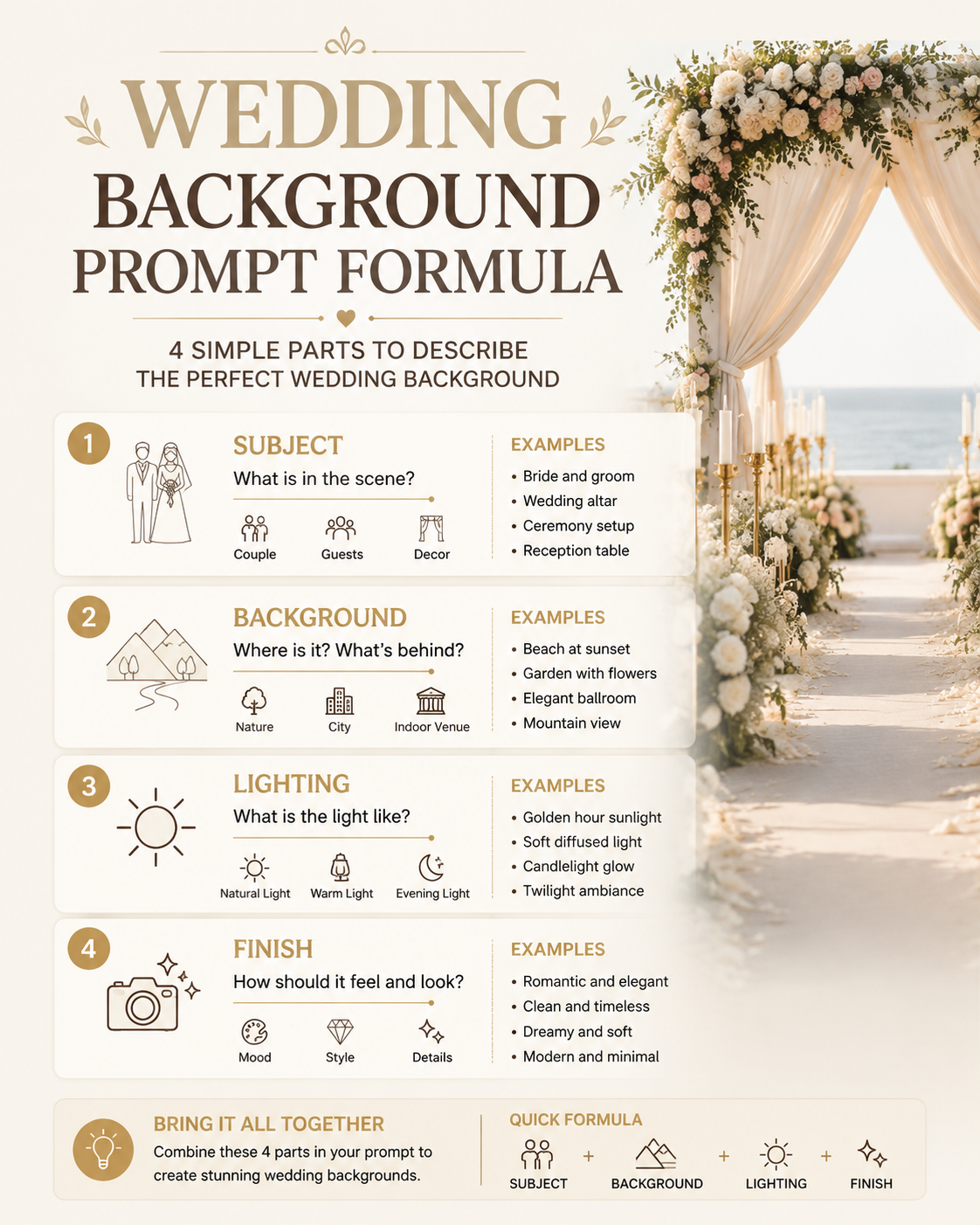
एक ready-to-use prompt जिसे आप homepage पर इस्तेमाल कर सकते हैं
अगर आप यूज़र को copy-paste करने लायक prompt देना चाहते हैं, तो यह सबसे useful हिस्सा है।
Preserve the original person's face, identity, and natural skin tone.
Transform the photo into a realistic luxury wedding photoshoot scene
with an elegant bridal atmosphere, soft natural lighting, refined
wedding styling, and a believable professional photography finish.

Use a romantic floral or architectural wedding background.
Keep the subject sharply recognizable.
Match the new light direction to the face and body.
Make the final image look like a premium real wedding portrait
instead of a generic AI edit.
यह prompt इसलिए अच्छा काम करता है क्योंकि यह एक साथ solve करता है:
- identity preservation
- wedding-specific setting
- realistic lighting
- premium finish
अगर आप इससे भी ज्यादा direct workflow चाहते हैं, तो सबसे practical तरीका है Create Wedding Photos खोलना और इस prompt को homepage पर paste करना।
Gemini chat की तुलना में dedicated wedding tool कब बेहतर है
Gemini prompt drafting और general image instructions के लिए useful है। लेकिन अगर goal specifically wedding photo result है, तो dedicated product ज़्यादा reliable हो सकता है।
क्योंकि specialized workflow आम तौर पर बेहतर होता है:
- wedding photography intent बनाए रखने में
- bridal / couple imagery consistency में
- generic outputs कम करने में
- prompt से usable result तक जल्दी पहुँचाने में
इसलिए practical सवाल यह नहीं है कि “क्या Gemini यह कर सकता है?”, बल्कि यह है कि “कौन-सा workflow जल्दी believable wedding result देता है?”
यहीं Create Wedding Photos सबसे natural next step बनता है।
Common mistakes
अगर result अभी भी fake लग रहा है, तो आमतौर पर कारण इनमें से एक होता है:
- original image low quality है
- prompt सिर्फ “wedding background” तक सीमित है
- lighting describe नहीं की गई
- identity preservation पर ज़ोर नहीं है
- style instructions बहुत broad या contradictory हैं
Better prompt इन समस्याओं का बड़ा हिस्सा generation से पहले ही हल कर देता है।
किस तरह की photos सबसे अच्छा काम करती हैं
सबसे अच्छे source images आमतौर पर ये होते हैं:
- clear portraits
- front-facing या slight-angle selfies
- face पर अच्छी lighting
- कम obstruction
- shoulders या upper body का कुछ हिस्सा visible
जितनी clean original image होगी, उतना आसान होगा natural wedding result पाना।
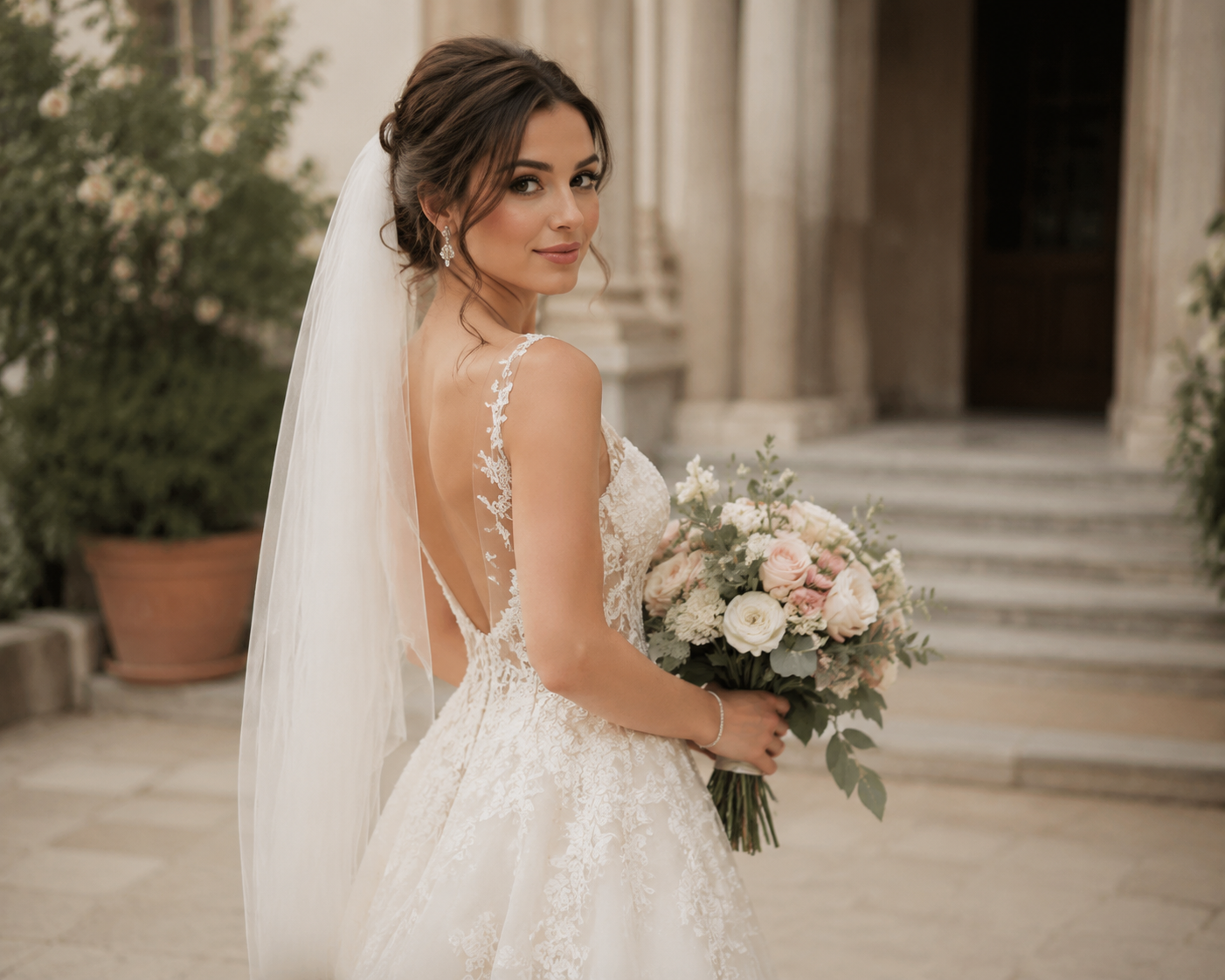
Final answer
अगर आप Gemini AI से फोटो का background एक natural wedding photoshoot scene में बदलवाना चाहते हैं, तो best results तब मिलते हैं जब आपका prompt इन 4 बातों को साफ define करता है:
- कौन recognizable रहना चाहिए
- किस तरह का wedding scene चाहिए
- कैसी lighting होनी चाहिए
- final image को किस तरह की wedding photography finish चाहिए
यही simple background edit और believable AI wedding portrait के बीच का फर्क है।
अगर आप chat tool में हर बार manually यह सब लिखने से बचना चाहते हैं, तो सबसे practical अगला कदम है Create Wedding Photos पर जाकर यही prompt इस्तेमाल करना।